
Copying and pasting components is pretty straightforward. However, if you run into an error while pasting, please check all the following items carefully.
IMPORTANT – Menu Components:
Some menu components (the ones that use the Mega Menu feature) require the following option to be ENABLED under Elementor > Editor > Settings > Features:
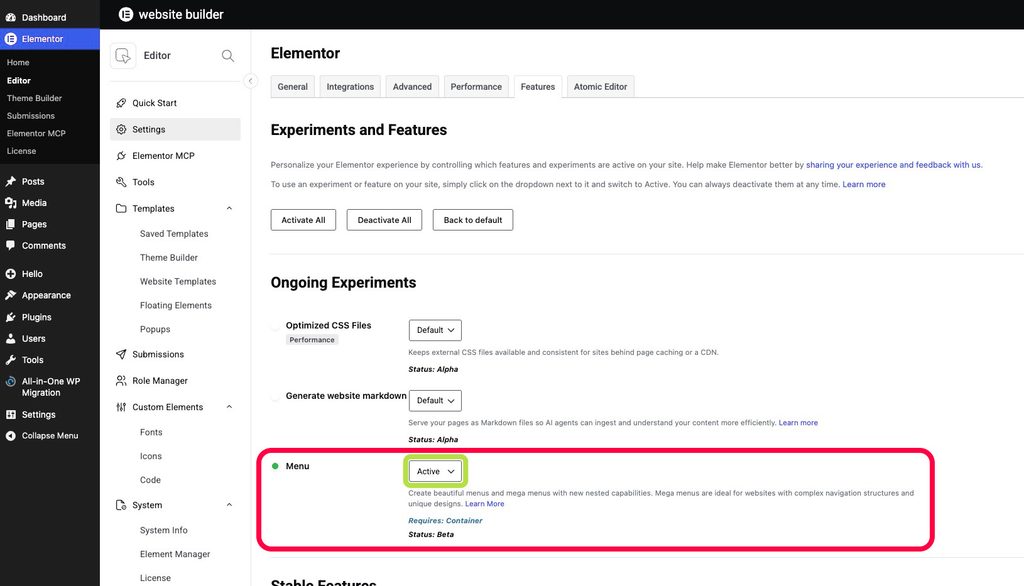
If this setting is set to false or to default, the pasting will fail. Cool! Moving on…
Basic checks:
- Elementor version: Your site is running the most recent version of Elementor.
- Enabled features: Your site has the same features turned on as the Component you copied. For instance, confirm that FLEXBOX containers are enabled in your Elementor settings (inside the Elementor menu in the WordPress sidebar menu).
The most common cause:
- Most of the time, this error is caused because you are trying to paste into an existing section or container. Make sure you are pasting into the NEW CONTAINER area – below your existing content, at the end of the page. The area you should always paste into is the dotted rectangular box with the buttons inside of it, and it looks similar to the picture below:

Other possible causes:
- Low PHP memory limits: Some hosting providers set you up with low PHP memory by default. Check the memory limit in WordPress in Tools > Site Health > Info > Server. The row is called “PHP memory limit“. The minimum should be 512MB. The recommended is 1024MB. If you need to adjust the memory limit, contact your hosting provider – or search for articles on how to increase that limite for that specific host.
- ModSecurity limits: ModSec is a module that some hosting provider activate by default which limits the amount of data that can be accepted by the server at a time. That limit can be very low and be easily hit when pasting content. You can turn ModSecurity off (through cPanel, or similar admin panel your hosting provider offers) while developing the website and turn it back on when you finish it, if you wish.
By keeping these points in mind, you’ll be able to make the most of Elements Rocket components in your Elementor projects, cutting down on time and elevating your website designs.
For any questions, don’t hesitate to get in touch at [email protected]
Need further help?
Most common issues can be resolved through the articles. However, if you need further help, we’re here for you. Reach out to us at [email protected]